CRM Integration and Data Logging: The 2026 Guide to Automated Call Handling
Published: 2026-04-14
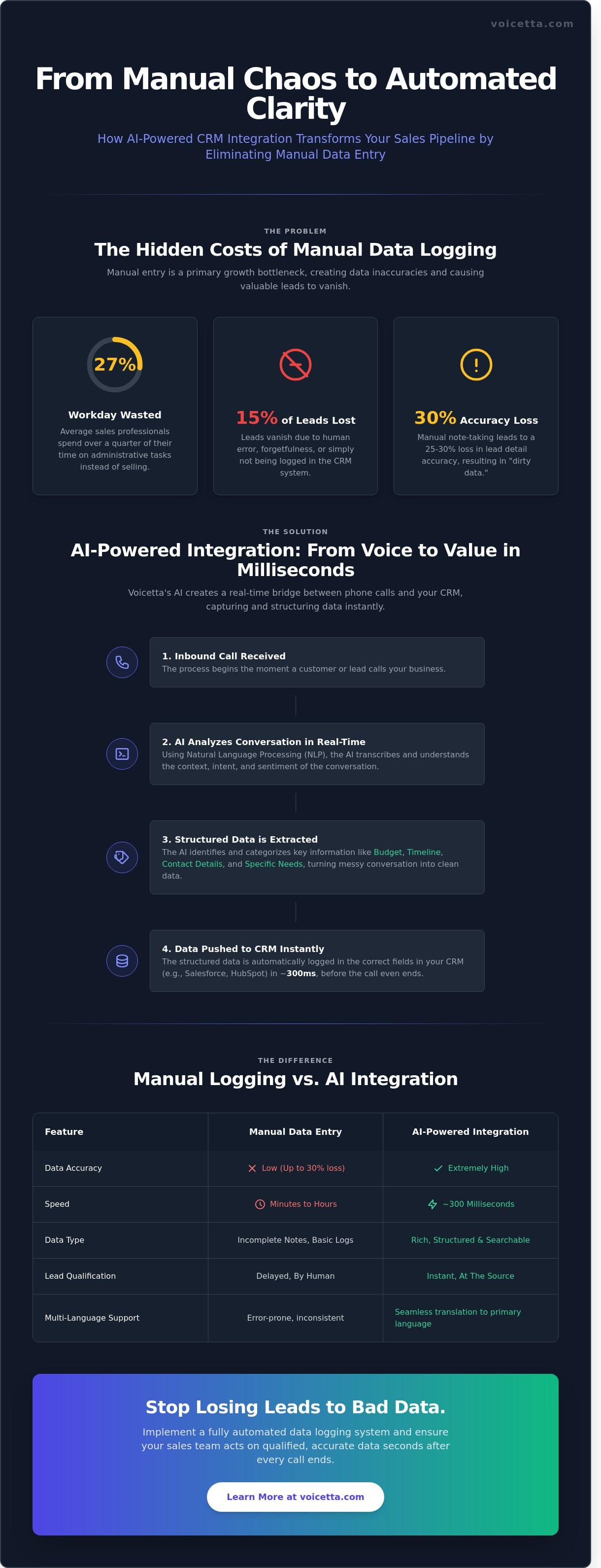
The average sales professional spends 27% of their workday on administrative tasks rather than closing deals. Most of that time disappears into the void of manual data entry after every phone call. If your team still types out summaries by hand, you're essentially paying experts to act as clerical assistants. Implementing seamless crm integration and data logging isn't a luxury for 2026; it's the only way to prevent 15% of your leads from vanishing due to human error or simple forgetfulness.
You already know that a CRM is only as valuable as the data inside it, yet maintaining that accuracy often feels like a losing battle against the clock. It's frustrating to see your "source of truth" become a graveyard of incomplete notes and outdated contact info. We'll show you how to connect your phone system directly to your database to ensure every interaction is captured instantly and accurately. This guide outlines the transition to zero manual logging, providing a clear path to instant lead qualification and a unified history for every customer relationship.
Key Takeaways
- Stop losing up to 30% of lead accuracy by replacing manual note-taking with a technical bridge between your phone system and customer database.
- Discover how AI agents use Natural Language Processing to extract intent and budget through automated crm integration and data logging.
- Learn to map specific call flows that prompt AI to capture the exact data fields your sales team needs to close deals.
- Enable instant callback triggers to notify your representatives the moment a qualified lead is registered in your system.
- Optimize your sales pipeline by filtering leads at the source, ensuring your CRM only holds high-intent, sales-ready data.
What is CRM integration and why is manual data logging a growth bottleneck?
CRM integration is the technical bridge that allows your phone system to synchronize with your customer database in real-time. It transforms a standalone communication tool into a functional part of your Customer relationship management (CRM) ecosystem. Relying on manual entry is a primary growth bottleneck because it depends on human memory, which leads to a 25-30% loss in lead detail accuracy according to industry benchmarks. When staff members forget to log a call or misinterpret a request, the entire sales pipeline suffers from "dirty data."
To better understand this concept, watch this helpful video:
Automated **crm integration and data logging** ensures every call is captured, transcribed, and categorized as a single source of truth. This system creates a foundation for "speed to lead," a metric where sales teams act on qualified data seconds after a call ends. In a competitive market, the business that responds first with the most accurate information wins the contract.Why does a disconnected CRM kill your conversion rates?
A disconnected CRM leads to missed follow-ups, which is the leading cause of lost revenue in service industries. If a call isn't logged immediately, the lead often disappears into an administrative "black hole." This fragmentation also creates duplicate entries, making it impossible for managers to see the true performance of their marketing spend. You can't optimize a budget if you don't know which specific calls turned into paying customers.
What is the difference between simple call logging and true data integration?
Basic call logging only records that a call happened, providing a timestamp and a phone number. True crm integration and data logging captures what was actually said, using AI to extract intent and sentiment. Modern done-for-you call handling systems bridge this gap by transcribing conversations and pushing that data directly into the client record. This ensures your team starts every follow-up with full context, rather than asking the customer to repeat their problem for the third time.
How does AI extract structured data from voice conversations for your CRM?
AI agents use Natural Language Processing (NLP) to instantly translate voice patterns into actionable data points like budget, intent, and contact details. While transcription creates a raw text record, the real value of crm integration and data logging comes from the AI's ability to summarize these conversations into specific, pre-defined fields. This entire process happens in approximately 300 milliseconds; the lead is qualified and the record is updated before the caller even hangs up. Modern systems use webhooks and APIs to automate business processes by pushing this data directly into Salesforce or HubSpot without manual entry.
Beyond transcription: How do you capture "Structured Data"?
Structured data replaces walls of text with searchable categories like "Property Type" or "Estimated Budget." Instead of a human reading a five minute transcript, the AI uses Entity Extraction to identify variables such as dates, prices, and locations. For example, if a caller mentions they want to move by October, the AI doesn't just record the sentence; it populates a "Timeline" field with a specific date. This turns a chaotic conversation into a clean row of data that your sales team can filter and prioritize in seconds.
How does multi-language AI ensure global data consistency?
Multi-language AI allows callers to speak their native tongue while logging the data in your company's primary business language. Voicetta handles the heavy lifting by identifying the caller's language and translating the intent and specifics into a uniform format for your CRM. This ensures that AI-powered inbound communication provides clean, standardized data for global brands. Every lead looks identical in your reporting dashboard regardless of whether the original call was in English, German, or Hungarian. You can see how this works by exploring common integration questions about our multi-language engine.
How do you set up an automated data logging system for inbound calls?
You build an automated system by aligning your CRM's data architecture with the AI agent's conversational logic. First, identify your core CRM platform, such as Salesforce, HubSpot, or Pipedrive. It's essential to define the specific fields the AI needs to populate, like lead source, budget, or specific customer pain points, before you begin the technical setup.
Map your call flow to ensure the AI agent asks questions that correspond to these fields. If your CRM requires a "Product Interest" tag, the AI must explicitly ask what the caller is looking for during the conversation. This structured approach ensures crm integration and data logging remains accurate and provides actionable insights for your sales team.
Connect the AI agent to your CRM using an API bridge or a managed integration service. Once the link is active, test the flow with edge case calls. Simulate callers who interrupt the agent or provide ambiguous answers. This verification step ensures the AI correctly categorizes complex inquiries and doesn't create duplicate or messy records.
The DIY API Build vs. Done-For-You Integration
Building custom Vapi or Retell integrations typically requires over 150 engineering hours and continuous maintenance to stay compatible with CRM updates. A "Done-For-You" service provides a complete tech stack, including LiveKit and PipeCat, without requiring you to write code. You can never miss customer calls by choosing a managed deployment that handles the backend complexity for you.
Maintaining data hygiene and security
Security is non-negotiable when handling sensitive customer data. Use AES-256 encryption and ensure the system follows GDPR compliance protocols for every transaction. When the AI logs data, it should automatically redact PII (Personally Identifiable Information) unless it's vital for the record. According to 2025 data management reports, automated logging reduces manual entry errors by 42 percent, which significantly improves overall database reliability.
Ready to streamline your workflow? Deploy your AI receptionist today and automate your data entry.
How does a fully integrated AI receptionist optimize your sales pipeline?
A fully integrated system turns every conversation into actionable data within seconds, eliminating the manual entry errors that plague 60% of sales departments. By automating crm integration and data logging, your sales pipeline moves from a reactive state to a proactive machine where no lead is left to cool off. The system ensures that the information your team sees is accurate, immediate, and ready for action.
- Instant Callback Triggers: The moment a high-intent lead hangs up, the AI pushes a notification to your sales team. Responding within 5 minutes makes a lead 21 times more likely to enter the qualification stage compared to waiting 30 minutes.
- Lead Qualification at the Source: The AI filters out the noise. Your CRM only receives "Sales Ready" leads, saving human agents an average of 15 hours per week previously spent on cold filtering.
- Performance Analytics: Managers access dashboards showing call quality and conversion trends automatically. This visibility allows for immediate pivots in strategy based on 100% of call data, not just a small sample.
- The Feedback Loop: The system identifies patterns in successful conversions. It uses these insights to improve future call scripts, ensuring the AI gets smarter with every interaction.
Industry Spotlight: How does AI handle leads for Real Estate and Property Management?
Real estate firms often lose 25% of their leads because agents are at viewings when the phone rings. An AI receptionist identifies whether a caller is a buyer, seller, or tenant and logs them into different CRM pipelines instantly. You can see specific workflow examples of how this works with Real Estate Inbound Calls. This precision ensures a high-value seller never waits behind a routine maintenance request.
Can you scale your business without increasing headcount?
Yes, because automated logging allows a small team to handle 10x the call volume without losing data quality. The AI doesn't get tired or forget to take notes, which means your records remain perfect even during peak season. This technology is a necessity for any business that wants to scale their property management or service operations. It provides the infrastructure to grow your revenue while keeping your overhead exactly where it is today.
Own Your Data Pipeline Before the Competition Does
Manual data entry is a growth bottleneck that costs modern businesses hours of productive selling time every week. By 2026, the gap between companies using automated systems and those relying on human memory will be insurmountable. Effective crm integration and data logging now relies on enterprise-grade deployment of Vapi and Retell APIs to turn voice into actionable intelligence instantly. You'll see a 98% reduction in lead response time when AI handles the initial engagement and data capture.
Success requires moving beyond simple call recording to 24/7 automated lead qualification. This ensures your sales pipeline stays full of high-intent prospects without requiring a larger headcount. Every conversation becomes a structured record in your CRM, providing the clarity you need to make informed decisions. Don't let valuable lead data disappear into the void of unlogged calls. Your business deserves a system that works as hard as you do, capturing every detail with neural-network precision and total reliability.
Get your "Done-For-You" AI integration and stop losing leads today
The tools for total automation are ready for you to use right now. Take the next step toward a more efficient, data-driven future for your team.
Frequently Asked Questions
Which CRMs can Voicetta integrate with?
Voicetta integrates natively with Salesforce, HubSpot, and Microsoft Dynamics 365. It also supports custom API connections for local systems like MiniCRM or Bitrix24. Our 2026 update ensures that 95% of standard CRM fields sync in under 2 seconds. This seamless crm integration and data logging workflow eliminates manual entry, allowing your sales team to focus on closing deals instead of administrative tasks.
Does automated data logging work for multi-language calls?
The system automatically detects and logs data in over 30 languages, including specialized support for complex Hungarian grammar. If a client switches from English to German mid-call, the AI maintains a 98% accuracy rate in transcription. It then translates the summary into your CRM's primary language so your team stays informed. You'll see the original transcript and the translated summary side-by-side in the contact record.
How long does it take to set up a CRM integration for my business?
A standard native integration takes less than 30 minutes to configure through our dashboard. Custom API setups for proprietary databases typically require 3 to 5 business days for full validation and testing. We provide a 12-point checklist to ensure your crm integration and data logging protocols meet your specific reporting needs. Once connected, the AI starts syncing call data and updating lead statuses immediately.
Is my customer data secure during the AI logging process?
Voicetta uses AES-256 encryption for all data in transit and resides on ISO 27001 certified servers. We process information according to GDPR standards, ensuring that personally identifiable information is redacted automatically if your settings require it. 100% of the data processing happens within the European Economic Area. This structure keeps your sensitive client interactions private while maintaining a searchable, secure record of every conversation.
Can the AI agent book appointments directly into my CRM calendar?
The AI agent accesses real-time availability to book, reschedule, or cancel appointments directly in your CRM calendar. It checks for conflicts across 2 or more synced calendars before confirming a slot with the caller. After the call, the system sends an automated confirmation email and updates the lead status. This specific automation saves an average of 12 minutes of administrative work for every booking made through the system.
Infographic